Introduction
In 2026, the era of “spray and pray” outreach has been definitively replaced by a “reject-first” ecosystem.
Major mailbox providers like Google, Microsoft, and Yahoo have transitioned from reactive filtering to proactive rejection at the gateway level.
For sales teams and marketers, cold email deliverability is no longer just about tweaking subject lines; it is a core architectural requirement.
If your technical infrastructure is weak, your carefully crafted message will not even reach the spam folder—it will simply be blocked.
This guide explores the essential strategies, technical protocols, and behavioral standards required to master cold email deliverability and solve the puzzle of how to stop emails going to spam in 2026.
1. The “Reject-First” Reality: Why Emails Fail in 2026
Historically, email providers operated on a “filter-first” basis, moving suspicious mail to the junk folder.
Today, unauthenticated traffic faces immediate termination.
Data indicates that rejection rates for non-compliant traffic have doubled compared to historical norms, with providers maintaining strict standards to combat AI-generated phishing and Business Email Compromise (BEC).
In 2026, organizations must understand that the primary inbox is a gated community reserved for verified identities.
If you are asking how to stop emails going to spam, the answer begins with acknowledging that missing authentication protocols now result in SMTP rejection codes (like 5.7.26) rather than just spam placement.
2. The Technical Foundation: The Authentication Trinity
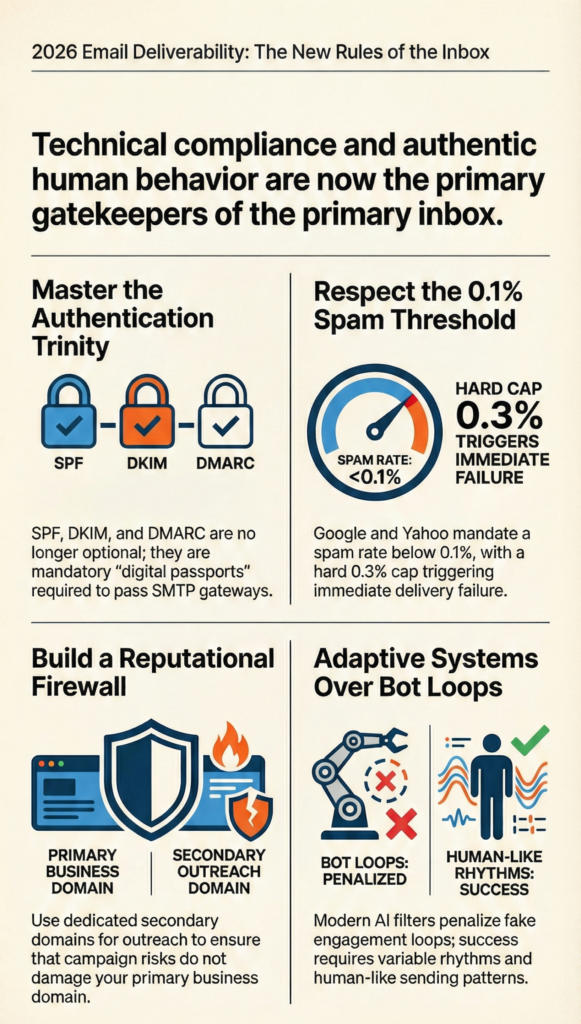
The “Authentication Trinity” (SPF, DKIM, and DMARC) is mandatory for bulk senders.
Failing to configure these correctly results in immediate penalties.
• SPF (Sender Policy Framework): This acts as a whitelist of IP addresses authorized to send mail for you. A critical challenge in 2026 is the 10-DNS-lookup limit. Modern tech stacks often exceed this, requiring “SPF flattening” tools to consolidate lookups and prevent delivery failures.
• DKIM (DomainKeys Identified Mail): This adds a digital signature to verify the email hasn’t been tampered with. The standard has evolved: 1024-bit keys are now considered insecure. You must use 2048-bit keys and rotate them regularly (every 90 days) to prevent replay attacks.
• DMARC (Domain-based Message Authentication, Reporting, and Conformance): This is the enforcer. A policy of p=none is no longer sufficient for cold outreach. Mailbox providers now expect a policy of p=quarantine or p=reject to prove you are a serious business entity and to protect your brand from impersonation.
3. Advanced Encryption: MTA-STS and DANE
Authentication proves who you are, but encryption protects how you send. The era of opportunistic encryption is gone.
• MTA-STS (Mail Transfer Agent Strict Transport Security): This protocol mandates that all incoming mail be delivered over an encrypted TLS connection. It prevents “downgrade attacks” where hackers try to force an unencrypted connection to intercept data.
• DANE (DNS-based Authentication of Named Entities): Leveraging DNSSEC, DANE binds certificates to domain names for robust assurance. Financial and government sectors increasingly require both MTA-STS and DANE for communication.
Implementing these protocols signals to providers like Google and Microsoft that your infrastructure is hardened and trustworthy, significantly boosting your cold email deliverability.
4. Infrastructure Strategy: The Reputational Firewall
Relying on a single primary domain for cold outreach is now considered a catastrophic risk. Best practices in 2026 dictate the creation of a “Reputational Firewall”.
Dedicated Subdomains: You should use dedicated subdomains (e.g., sales.company.com) or secondary domains for prospecting. This ensures that any reputational damage from outreach does not impact your primary domain used for internal and transactional communication.
The New Warm-Up Protocol: Warm-up tools have evolved because providers can now detect artificial “ping-pong” traffic. The 2026 protocol requires a 4–8 week gradual ramp-up:
• Weeks 1-2: Send 10-20 emails daily to highly engaged seed accounts.
• Weeks 3-4: Expand to 50 emails, introducing varied content.
• Weeks 5-8: Scale toward target volume, monitoring reputation dashboards daily.
5. Content and AI: Beating the Intent Filters
Mailbox providers now use advanced AI, such as Google’s RETVec, to analyze the “intent” and “style” of a message. They analyze the “Digital Fingerprint” of your sending behavior.
How to stop emails going to spam in this environment involves avoiding “Style Mimicry” flags. If a sender suddenly adopts an urgent, formal tone with a recipient they have never contacted, AI filters assign a high-risk score.
To succeed:
• Avoid Spam Triggers: Words like “guarantee,” “free,” or excessive capitalization are immediate red flags.
• Hyper-Personalization: Use intent data (hiring signals, news) to make the message relevant. Generic templates are easily identified by AI as automated spam.
• Plain Text: Prioritize plain text or minimal HTML (95/5 text-to-image ratio) to look like a human-to-human conversation.
6. The Compliance Gate: Spam Rates and Unsubscribes
Compliance is now a technical signal used to determine trustworthiness.
The 0.1% Rule: The spam complaint rate is the most critical metric. You must maintain a rate below 0.1%. If you hit 0.3%, you are ineligible for mitigation and face immediate filtering. This is a hard cap enforced by Google and Yahoo.
RFC 8058 (One-Click Unsubscribe): For bulk senders, a simple link in the footer is no longer enough. You must implement RFC 8058 headers:
• List-Unsubscribe-Post: List-Unsubscribe=One-Click
• List-Unsubscribe: <https://domain.com/unsubscribe>
This allows the email client (like Gmail) to show a native “Unsubscribe” button at the top of the email. If you fail to implement this, frustrated users will use the “Report Spam” button instead, destroying your reputation.
7. Visual Trust: Implementing BIMI
Brand Indicators for Message Identification (BIMI) allows you to display your verified logo next to your email in the inbox.
In 2026, this is a powerful psychological signal of trust.
To use BIMI, you must have DMARC enforced at p=quarantine or p=reject.
New updates, such as the lps= tag, allow brands to customize logos for different departments (e.g., support vs. sales), adding granular branding to your authenticated emails.
8. Managing Sending Limits
Even with perfect infrastructure, exceeding volume limits will hurt your cold email deliverability.
• Google Workspace: 2,000 messages/day.
• Microsoft 365: 10,000 messages/day.
• Zoho: Strict policies against cold outreach; often caps at 500/day.
To scale beyond these limits without triggering alarms, use Sender Rotation.
This involves distributing your campaign load across multiple inboxes and domains to maintain low per-inbox volume (e.g., 50 emails/day), mimicking natural human behavior.
Conclusion
The path to the inbox in 2026 is paved with technical rigor.
Success is no longer about volume; it is about identity, relevance, and compliance.
To master cold email deliverability and solve the problem of how to stop emails going to spam, you must:
1. Authenticate with SPF, DKIM, and enforced DMARC.
2. Encrypt with MTA-STS.
3. Isolate reputation using dedicated subdomains.
4. Comply with RFC 8058 one-click unsubscribes.
5. Personalize content to pass AI intent analysis.
In the reject-first era, the most effective “hack” is simply being a sender that looks, acts, and technically verifies as a legitimate professional.